Release notes 2025
This page contains release notes that apply to all APIs on the Base platform for the 2025 versions.
2025r4
Secure email communication without username and password
On service configurations and certain viewers on report definitions, it is possible to configure email settings. These include an email user, email password and the Use TLS connection check box.
Previously, it was not possible to use a secure connection without having the email user and password defined. In this case, the email would not be sent. (RN-2074)
From this version, a secure connection can be used without requiring authentication. This means the Use TLS connection check box can be selected while the email user and password are left empty to send secure emails.
Fixed issues
-
From this version, passwords and/or tokens are always obfuscated in REST exchange log entries, even if an unknown content type or a wrong content type is used in the calls.
-
Previously, in REST APIs, searches with percent-encoded characters in the URL, such as %25 representing %, had double encoding, leading to failures. For example, the title Next 10% could only be found if it was included as Next%2010%2525 instead of Next%2010%25. This issue has been fixed in this version.
-
Previously, when the publication API was not listed in the Available Business APIs on the WOnComponent drop-down list, it could still be added to the business API interface service. This issue has been fixed in this version.
2025r3
Fix for empty collections
Previously, sending POST or PUT calls using any of the BAPIs would crash if a collection array was empty, such as broadcastWindows in the POST /trailers call of the trailer API, and no corresponding message existed to signal that it could not be removed. This issue has been fixed in this version. The APIs can now handle empty collection arrays.
2025r1
Performance tracing on business API and open API
When the business API or open API services execute REST calls, they are logged in a REST exchange log entry. This log entry shows how long it took to receive a response.
To have more information on what is done during these calls, the performance tracing can also be enabled on the Business API interface service and Configurable REST interface service.
In the Logging tab, the PERFORMANCE TRACING group box has been added with the following properties:
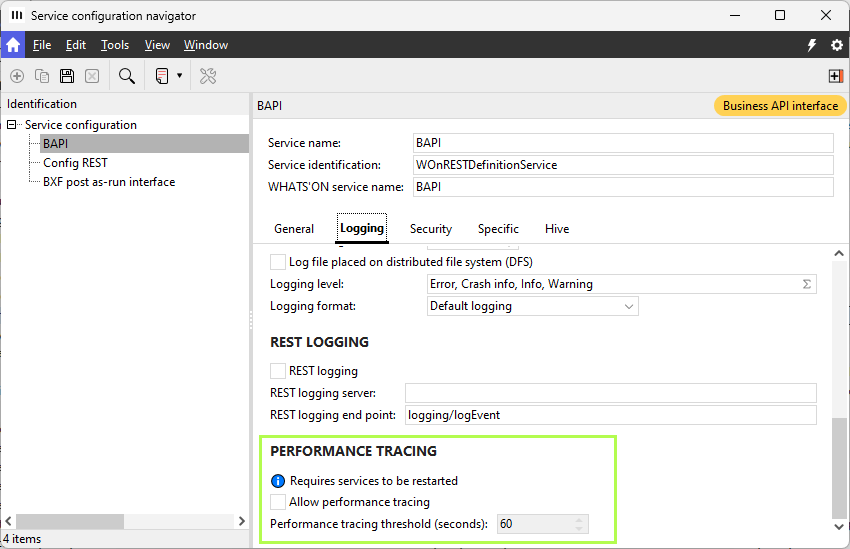
-
A note to inform users that the service has to be restarted after selecting the check box below.
-
Allow performance tracing: Select to enable performance tracing for the service. When this is done, the Performance tracing threshold is enabled.
-
Performance tracing threshold (seconds): Type or choose the threshold for the performance tracing, which is set to 60 seconds by default. The minimum value is 0, which can be used to trace calls that only take milliseconds. Performance tracing applies only to calls that exceed the defined threshold.
Note that the Logging check box in the tab also has to be selected or the performance is not traced either.
See the performance tracing browser and navigator for more info on the performance logs.